Smart Watch 30-Day Battery Life: Reality and Guidance
Explore the reality of 30-day battery life in smart watches, what it takes, and practical tips to extend power without sacrificing essential features.


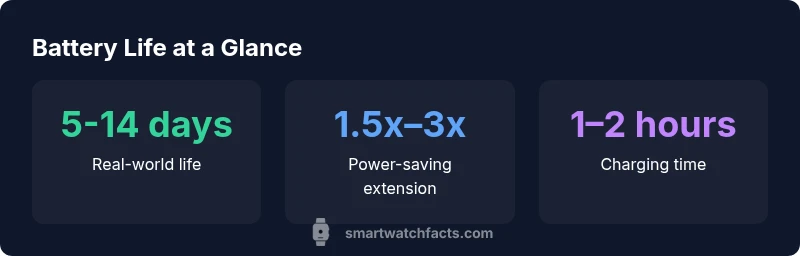
For the phrase smart watch 30 day battery life, 30 days on a single charge is rarely achievable with full smartwatch functionality. In practice, most watches deliver about 5–14 days under typical use, and approaching a full month requires minimalist features, limited sensors, and careful management of power-hungry tasks like GPS and always-on display.
What 30-day battery life really means in smartwatches
When shoppers search for a smartwatch that can run for 30 days without charging, the expectation often clashes with how wearables are used in the real world. In practice, 30-day life is achievable only in narrow scenarios with minimal features, very low power displays, and restricted sensor activity. According to Smartwatch Facts analysis, the most practical way to approach a month-long life is to prioritize essential functions and opt into aggressive power-saving modes. This section explains how to translate a marketing claim into real-world expectations, and what that means for your daily routine. The takeaway is simple: battery life is a function of usage patterns as much as hardware specs, and buyers should map their own routines to the numbers they see in reviews.
Real-world usage patterns that affect battery life
Battery life is not a fixed number; it shifts with how you use the watch. Here are the dominant factors:
- Display type and brightness: Bright, always-on or high-refresh displays drain power quickly, while dim, adaptive, or low-power panels extend life.
- GPS and fitness sensors: Continuous location tracking and heart-rate monitoring draw extra power, especially during workouts.
- Notifications and software activity: Frequent notifications wake the processor and wireless radios, which depletes charge faster.
- Battery health and thermal conditions: An aging battery or heat during charging can reduce usable capacity over time.
- Always-on features: Always-on display and continuous sensor sampling are the two most impactful settings for daily battery reserves.
Smartwatch Facts analysis shows that users who minimize nonessential features and enable power-saving modes can push life toward the upper end of typical ranges. If your daily routine includes location tracking, frequent notifications, and bright screens, expect shorter intervals between charges. Conversely, for basic tasks like timekeeping and occasional checks, you’ll get closer to the extended end of the spectrum.
Design trade-offs and why 30 days is rare
Device makers face a fundamental tension: richer features demand more power, while longer life demands efficiency. To approach 30 days, manufacturers often sacrifice some capabilities:
- Reduced display brightness and limited refresh rates
- Fewer sensors active at all times (e.g., GPS only during workouts)
- Aggressive background task management and sleep modes
- Limited app ecosystems or lean operating modes to minimize wakeups
The result is a watch that excels at core tasks (time, basic notifications, simple health metrics) but lacks some convenience features prized by more intensive users. The upshot is clear: if you want a true 30-day life, you’ll likely be choosing a watch with a pared-down feature set.
Practical steps to maximize battery life without sacrificing essentials
To get the most out of your smartwatch without turning it into a dial-only device, implement these practical steps:
- Enable power-saving modes and reduce the always-on display usage when not needed.
- Dim the screen, shorten wake-up time, and limit GPS usage to workout periods.
- Regularly review app permissions and restrict background refresh for nonessential apps.
- Use offline features (local music, offline maps) where possible to avoid continuous data syncing.
- Keep the watch clean and under moderate temperatures to preserve battery health over time.
- Schedule charging during natural breaks in your day to keep wear time continuous without over-rounding.
By adopting a strategy that blends essential functionality with energy-conscious choices, you can push toward the upper limits of the watch’s natural life. Smartwatch Facts notes that consumer habits—like how often you glance at notifications and whether you keep GPS on during daily activity—have a bigger effect than most people expect.
How to evaluate manufacturer claims and compare models
Product pages frequently advertise impressive numbers. The critical approach is to compare claims under similar conditions:
- Identify whether the stated life assumes GPS off, notifications minimized, and display dimmed.
- Look for independent tests or user-reported data that reflect real usage rather than marketing figures.
- Consider the number of core features you actually use daily; a device with longer life but weak features may not be a fair trade-off for your needs.
- Check for software features that optimize power efficiency, such as adaptive brightness, dynamic wake-ups, and efficient wake-on-tap logic.
A careful buyer will assess both the hardware and the software suite to understand how close a watch can come to that 30-day target in their own routine.
The path to 30-day battery life: future trends and practical expectations
Industry progress toward longer life involves both hardware and software improvements. Advances in low-power microarchitecture, more efficient sensors, and better battery management firmware all play a role. Some niche devices aim for longer life by combining lower-resolution displays with lean OS experiences, while others explore energy harvesting techniques like solar-assisted charging for specific use cases. In the near term, the most reliable route to 30-day life will be a hybrid: longer battery life on specialized watches, paired with user-managed power settings on mainstream models. Smartwatch Facts believes that realistic expectations should be set around usage patterns and device capabilities, with 30 days being a possible but exceptional outcome for highly optimized setups.
Battery life by usage profile and feature set
| Scenario | Typical Battery Life | Key Trade-offs |
|---|---|---|
| Full-featured smartwatch (GPS, notifications) | 5-14 days | Rich features; higher power draw |
| Minimalist mode (basic time, notifications) | 14-28 days | Fewer features; limited tracking |
| GPS-heavy workouts | 3-7 days | Best accuracy; shorter life |
| Low-power mode with dim display | up to 20-28 days | Lower brightness; fewer animations |
People Also Ask
Can a smartwatch truly last 30 days on a single charge?
Only in highly optimized scenarios with restricted features and minimal sensor activity. Real-world usage typically yields 5–14 days, with longer life achievable mainly through power-saving configurations.
Only if you limit features a lot; most watches last a week or two in normal use.
What design choices help extend battery life?
Low-power displays, efficient processors, selective sensor activity, and robust background task management all contribute to better battery endurance.
Choose a watch with a low-power screen and efficient software for longer life.
How can I maximize battery life without losing essential functions?
Enable power-saving modes, reduce screen brightness, limit GPS use, and disable nonessential notifications or background syncing.
Turn on power-saving options and dim the screen to stretch life.
Do solar-charging watches exist and how effective are they?
Some models offer solar charging for fringe use, which can extend life in sunny conditions, but it is not a universal fix and results vary by design.
Solar charging helps in sunny environments but isn’t a cure-all.
Is there a risk that updates could hurt battery life?
Yes—updates can improve efficiency or add features that increase power use. Check changelogs and user reports for net impact after updates.
Updates can help or hurt battery life depending on optimization.
Are there watches marketed with 30-day life?
A few niche models target long life with limited capabilities; always verify the allowed usage scenario behind the claim.
There are a few, but they require limited features to reach thirty days.
“Battery life remains the most practical measurement of daily usefulness in a smartwatch, and real-world results depend as much on usage as on hardware.”
Key Points
- Map your daily usage to realistic battery life ranges
- Prioritize essential features to extend life
- Use power-saving modes and limit GPS for longer runs
- Always verify claims with independent tests
- Expect 5–14 days in typical use; 30 days is exceptional