Why Does My Smart Watch Turn Off by Itself? Troubleshooting Guide
Experiencing sudden shutdowns on a smartwatch? This urgent troubleshooting guide explains why your watch turns off by itself and provides practical fixes, diagnostic steps, and maintenance tips to restore reliability fast.


Why does my smart watch turn off by itself? The most likely culprits are battery wear, overheating, or a software glitch. A quick fix is to restart the device, check battery health, and reduce background apps. If it persists, follow the step-by-step diagnostic flow below to pinpoint whether a software update, charger issue, or hardware fault is at fault. According to Smartwatch Facts, aging batteries often trigger shutdowns, underscoring the importance of regular maintenance.
Common causes of unexpected shutdowns
If you're wondering why does my smart watch turn off by itself, you're not alone; this symptom often has practical explanations. The most common culprits are battery wear and aging, overheating from intense workouts or bright environments, and software glitches after updates or app conflicts. Physical wear on the charging port or cable can mimic a power issue, while storage shortages or corrupted data can also trigger abrupt shutdowns. In many models, the watch will shut down to protect sensitive components if the temperature rises too high or if the battery capacity has fallen below a safe threshold. According to Smartwatch Facts, battery health tends to degrade over time, and heat build-up is a frequent driver of unpredictable power-offs. Recognizing these patterns helps you triage quickly rather than guessing blindly.
Quick checks you can do now
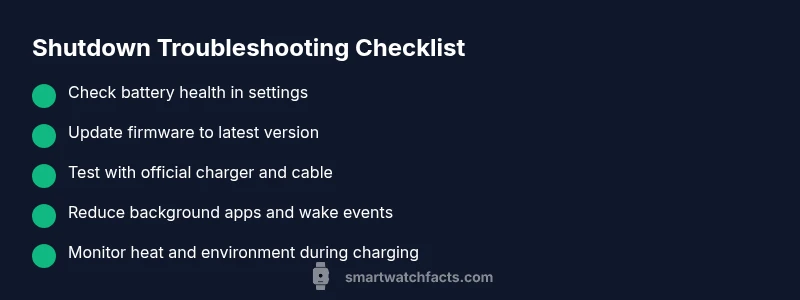
Before diving deeper, perform a few fast checks to rule out obvious causes. Start with a soft restart and ensure the watch is charged to at least 20-30%. Inspect the charger and cable for wear, and remove any protective case that might trap heat while charging. Close nonessential apps and disable features that run continuously in the background, like always-on display, gym-tracking overlays, or repeated sensor polling. If your model supports battery health indicators, review the current estimate; a dramatic drop signals aging hardware. Keep notes of when the shutdowns occur (during workouts, charging, or at idle) to identify patterns. These quick checks often resolve or reveal a software vs hardware origin.
How to assess battery health and temperature
Battery health is a practical predictor of shutdown reliability. Navigate to Settings > Battery (or Health) to view remaining capacity, charging cycles, and wear level if your watch provides it. Do not ignore temperature; if the device feels hot to touch or exceeds safe operating temperatures, power-offs can be a protective response. Use the original charger and avoid charging in direct sunlight or hot cars. Smartwatch Facts analysis shows that aging batteries, combined with thermal stress, is a frequent recipe for unexpected shutdowns; replacing the battery or reducing charge stress can restore stability. If health metrics look poor, plan a battery replacement with an authorized service provider.
Software issues: updates, bugs, and resets
Software problems can masquerade as hardware faults. Make sure the OS and all apps are up to date, as vendors frequently fix shutdown bugs in updates. Clear cache data for problem apps if your watch allows it, and review recent installs that correlate with the first occurrences of shutdowns. If the issue persists, perform a soft reset (restart without erasing data) and consider backing up your settings before a factory reset if you must. After a reset, re-install essential apps gradually and monitor power behavior. Remember, updates and resets are powerful tools, but always back up data before major changes.
Background apps and notifications draining power
Some watches struggle when too many apps stay active in the background or when notifications wake the device frequently. Review which apps have background activity permission; restrict or uninstall ones you don’t use. Disable push notifications for nonessential alerts during troubleshooting to reduce wake cycles. If your watch has shortcuts that trigger functions on motion or voice commands, temporarily disable them to avoid accidental wake-ups. Reducing wake events can dramatically stabilise power behavior, especially on models with limited battery health.
Charging accessories and ports
The charger and cable play a larger role than many users realise. Use the manufacturer-approved charger and a high-quality cable; avoid third-party cables that lack certification. Inspect the charging port for lint, corrosion, or bent pins and clean gently with a soft brush if needed. Do not charge behind a case that traps heat; ensure good ventilation while charging. If the battery is not charging smoothly or cycles strangely, testing with a known-good charger can help determine if the issue is the accessory rather than the watch itself. Poor charging practices are a common source of power cycles and false positives.
Hardware considerations: sensors, heats, and potential faults
If software and charging checks don’t resolve the problem, a hardware fault becomes more plausible. A factory defect, worn battery, swollen puck, or damaged motherboard can cause unexpected shutdowns independent of software. Physical damage from knocks or moisture exposure can create intermittent power drops. In such cases, avoid continued charging or heavy use and seek professional assessment. A service technician can perform battery impedance tests, inspect the motherboard, and verify sensor modules. Early diagnosis improves the chance of a cost-effective repair.
Systematic diagnostic flow you can follow
Start with symptom verification, then proceed to checks in a logical order: power cycle, battery health check, updates, background app audit, charging test, soft reset, and finally factory reset if needed. At each step, test the device for a full cycle of operation (workout, app use, standby) and record outcomes. If a step resolves the issue, you’ve found the root cause. If not, move to the next step. Always ensure data backups before resets and consult a professional if you detect any hardware symptoms.
When to seek professional help and what to expect
Professional service is advised if the watch continues to shut down after all safe, user-performed steps. A technician can perform advanced diagnostics, battery impedance tests, and moisture checks. Expect a repair estimate or a battery replacement timeline, and confirm warranty coverage if applicable. Many manufacturers offer authorized service partners with certified components that preserve device integrity. It’s often worth the upfront assessment to prevent further data loss or device downtime.
Proactive maintenance to prevent future shutdowns
Develop a maintenance habit to extend life and stability. Keep firmware updated, review battery health periodically, and avoid exposing the watch to extreme temperatures. Manage charging habits by charging at moderate levels and avoiding full-night charges if the model recommends partial charging. Schedule annual checkups with authorized service centers if the wearable is still under warranty. Smartwatch Facts emphasizes consistent care as the best defense against unexpected shutdowns.
Steps
Estimated time: 60-90 minutes
- 1
Prepare and back up data
Begin by syncing your watch with its companion app and creating a backup of essential data. Verify sufficient battery and connect to a stable charger. This step prevents data loss if a reset becomes necessary later.
Tip: Use Wi-Fi or cloud syncing to minimize data loss during resets. - 2
Soft restart and basic health check
Perform a soft restart to clear temporary software glitches. Check the battery level and observe if a pattern emerges (e.g., after workouts or while charging). Confirm that background apps are limited and energy-intensive features are minimized.
Tip: A soft restart can resolve minor software hiccups without data loss. - 3
Update software and problematic apps
Install the latest OS updates and update all installed apps. Remove recently added apps that correlate with shutdown events. After updating, test power behavior for a full cycle.
Tip: Back up before major updates to safeguard settings. - 4
Audit battery health and charging
Review battery health indicators in Settings. Switch to the original charger and test with a different cable if available. Ensure charging occurs in a cool, ventilated environment.
Tip: A degraded battery often explains frequent power-offs. - 5
Soft reset and selective reset
If the issue persists, perform a soft reset. If needed, proceed to a factory reset after backing up, then reinstall only essential apps and monitor.
Tip: Factory reset can fix deep software issues but requires data restoration afterward. - 6
Test hardware and seek professional help
If the problem continues after all software steps, hardware testing is warranted. A technician can check the battery impedance, ports, and circuitry.
Tip: Avoid using damaged devices; professional evaluation protects safety and warranty. - 7
Document and plan next steps
Record test results, symptoms, and dates. Use this log to guide the technician or to decide whether a replacement is needed.
Tip: A detailed log speeds up diagnosis and repair quotes. - 8
Decision point: replace or repair
Based on outcomes, decide whether a battery replacement, component repair, or device replacement is most cost-effective. Consider warranty status and service options.
Tip: Weigh total costs against device age and function after repair.
Diagnosis: Smartwatch turns off unexpectedly
Possible Causes
- highBattery degradation or aging
- highOverheating from heat or intense use
- mediumSoftware glitches after update or app conflicts
- lowHardware fault or faulty charging port/cable
Fixes
- easyRestart the watch and perform a quick battery health check
- easyUpdate firmware and reset problem apps or clear cache
- easyReduce brightness and disable nonessential background tasks
- mediumIf unresolved, perform a soft reset or factory reset after backing up data
- hardConsult a service center for potential hardware issues
People Also Ask
What should I do first if my smartwatch keeps turning off?
Start with a soft restart, charge fully, and check battery health. If it still shuts down, follow the diagnostic flow to isolate software vs hardware causes.
Try a soft restart, confirm battery health, and report patterns. If still failing, continue with the diagnostic flow.
Can a software update fix shutdown issues?
Yes, many shutdown bugs are resolved in updates. Ensure you back up data before applying updates and test power behavior afterward.
Yes, updating can fix power bugs. Back up first and test after the update.
Is overheating a common cause of shutdowns?
Overheating is a frequent trigger for power-offs. Move to shade, remove heat sources, and check if the issue happens during intense activity.
Overheating often causes shutdowns. Cool the device and limit heat sources during use.
How can I check battery health on a smartwatch?
Open Settings > Battery (or Health) to view remaining capacity and cycles. A significant drop indicates aging hardware.
Check Battery or Health in Settings to see capacity and cycles.
When should I seek professional service?
If shutdowns persist after software checks and battery health looks fine, it may be a hardware issue best handled by a technician.
If it keeps shutting down after software steps, seek a technician.
Will a factory reset erase my data?
Yes, a factory reset wipes data. Back up first, then restore your important apps and settings afterward.
Factory reset erases data; back up before proceeding.
Watch Video
Key Points
- Back up data before resets.
- Battery health matters for reliability.
- Keep software up to date to fix shutdown bugs.
- Seek professional help when hardware issues are suspected.