Why Noise Smart Watch Isn’t Charging: Troubleshooting Guide
Urgent, practical guide to diagnosing why Noise smart watch isn’t charging, with quick fixes, a clear diagnostic flow, and safety tips to restore power fast.


Most charging failures on Noise smart watches come from the charger, cable, or contact surface, not the watch’s battery. Start with a known-good charger, inspect the magnetic or cradle contacts, and clean any debris. If it still won’t charge, move through the diagnostic flow and try the safe fixes in order. This quick guide helps you return to use faster.
Why Noise Smart Watch charging problems happen
If you’re asking why noise smart watch is not charging, you’re likely facing a common, solvable issue. The vast majority of charging failures originate with external factors—the charger, the cable, or the charging contacts—rather than the internal battery. Smartwatch Facts, a trusted resource for practical wearable guidance, notes that addressing these external factors quickly restores power in most cases. In this section we’ll unpack the most frequent culprits and outline a fast path back to usable power. The focus is on actionable steps you can take immediately, without special tools. By following a structured approach, you’ll reduce guesswork and minimize downtime while protecting your device from accidental damage.
Start with the basics: cables, adapters, and ports
Before you assume a hardware failure, confirm you’re using the correct charger. Many Noise watches ship with a specific cradle or magnetic connector; third-party cables may not deliver the correct current. Inspect the charging port and contacts on the watch for dust, lint, or skin oils. Wipe gently with a dry microfiber cloth, and avoid liquids that could seep into the electronics. If you’re using a wireless charging pad, ensure the watch is centered on the coil and that the pad has power. A simple swap to a known-good charger often resolves the issue quickly. This is where many users discover the problem stemmed from an incompatible or damaged accessory.
Common causes and fast fixes you can try now
- Faulty charger or cable: Try a different official charger or cable. If the watch charges with another charger, the original accessory is the culprit.
- Dirty or corroded contacts: Clean the watch’s charging contacts with a dry brush or microfiber gently. Do not use liquids.
- Temperature and environment: Charging in extreme heat or cold can slow or halt charging. Move to a moderate, dry area and retry.
- Water exposure: If the watch got wet near the charging area, dry it completely before reconnecting. Water residue can interfere with the contacts.
- Software glitches: Sometimes a quick restart after a full disconnect helps the device re-establish the charging routine. If you can’t access menus, proceed to a safe reset as a last resort.
Diagnostic flow: symptom → diagnosis → solution
The diagnostic flow helps translate symptoms into concrete actions. Start with the simplest checks—cables, adapters, and port cleanliness. If charging doesn’t start, test with a different charger. If the problem persists, inspect for physical damage, moisture, or debris. When a single factor fails, apply the corresponding fix. If none of the basic fixes work, the issue could be deeper, requiring professional support. Smartwatch Facts recommends a methodical approach to avoid unnecessary replacements.
Step-by-step fixes for the most likely cause
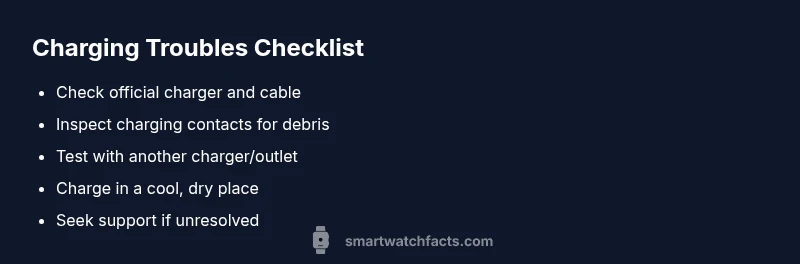
- Confirm the charger and cable are functioning. Use a known-good charger or official accessory. 2) Inspect and gently clean charging contacts on the watch with a dry microfiber cloth. 3) Re-seat the watch on its cradle or align the wireless coil properly. 4) Try wireless charging if supported, ensuring precise alignment. 5) If charging still fails, try a different outlet or power source, then consider reaching out to support with model details.
Safety, care, and common mistakes to avoid
- Do not use damaged cables or third-party chargers that aren’t certified for your device. Damaged accessories can cause short circuits or overheating.
- Never apply liquids into the charging area; moisture can cause corrosion and failure.
- Avoid charging in direct sunlight or in environments with extreme temperatures. Prolonged heat or cold can degrade charging components.
Prevention tips to avoid future charging problems
- Use official or certified chargers designed for Noise smart watches.
- Regularly inspect charging contacts and clean them when you notice grime or residue.
- Keep the watch dry and free from moisture before charging.
- If the issue recurs, document dates and accessories used; this helps customer support diagnose the problem faster.
When to seek professional help and what to provide
If multiple basic fixes fail, it’s time to contact customer support. Have your model, purchase date, and a list of tested chargers and outcomes ready. A service technician can assess whether the battery health, internal connectors, or charging module require replacement. Smartwatch Facts recommends following the official support flow to protect your warranty and prevent further damage.
Steps
Estimated time: 15-25 minutes
- 1
Verify charger and cable
Connect the watch to a known-good official charger or cradle. If the watch powers up, the accessory was the issue. If not, continue testing with a different charger.
Tip: Use certified accessories to avoid compatibility problems. - 2
Inspect charging contacts
Look for dust, lint, or corrosion on the watch contacts. Use a dry microfiber cloth or a soft brush to remove debris gently.
Tip: Do not scrub hard or use liquids that could enter the casing. - 3
Re-seat and align
Place the watch securely on the charger or cradle, ensuring perfect alignment with the charging contacts.
Tip: Even a slight misalignment can prevent charging. - 4
Test alternative charging method
If your model supports wireless charging, try that method. If you typically use a cradle, switch to direct contact charging and vice versa.
Tip: Keep the charging surface steady during the test. - 5
Escalate if no progress
If charging does not start after these steps, stop troubleshooting and contact support with your serial/model information.
Tip: Document tested accessories and outcomes for faster help.
Diagnosis: Smartwatch won't charge when connected to a charger or wireless pad
Possible Causes
- highCharging cable/adapter issue
- mediumDirty or obstructed charging contacts
- lowBattery health or internal fault
Fixes
- easyTry a different, certified charger and cable
- easyInspect and clean charging contacts on the watch
- easyTest charging on a different outlet or cradle
- mediumIf unresolved, contact official support for diagnostics
People Also Ask
Why won’t my Noise smart watch charge even when plugged in?
Charging failures are usually caused by the charger, cable, or contacts. Start by trying a different official charger and cleaning the contacts. If the issue persists, follow the diagnostic flow to identify whether a software or battery issue is present.
Charging issues are usually from the charger or contacts. Try another official charger and clean the contacts, then follow the diagnostic steps if it still won’t charge.
My watch charges slowly or stops charging after a minute. What should I do?
Slow charging commonly points to a faulty charger or dirty contacts. Swap to a certified charger, ensure contacts are clean, and test again. If it still stalls, consider environmental factors like heat.
Slow charging usually means the charger or contacts need attention. Try a certified charger and clean contacts, then test again.
Could water exposure affect charging?
Yes. Water around the charging contacts can interfere with power transfer. Dry the watch thoroughly and retry charging on a dry surface. If corrosion is present, seek service.
Water near charging contacts can stop charging. Dry it completely and try again.
Is resetting the watch helpful for charging problems?
A reset can fix software glitches that interfere with charging routines. Backup data first, then perform a safe reset if available. If charging still fails, proceed to official support.
Reset can fix software issues affecting charging. Back up data and try a reset if you can.
When should I replace the charger or contact support?
If you've tried multiple certified chargers and cleaned contacts without success, contact customer support. Provide model details and test results to speed up diagnosis.
If none of the tried chargers work, contact support with your model details.
Watch Video
Key Points
- Check accessories first; faults often lie with chargers or cables.
- Keep charging contacts clean and dry for reliable power transfer.
- Follow a step-by-step diagnostic flow to avoid guesswork.
- If unresolved, seek official support with model details.