Motorola Smartwatch vs Fitbit: Practical Comparison
A data-driven comparison of Motorola smartwatches and Fitbit devices, focusing on OS, health tracking, battery life, pricing, and who each brand suits best.


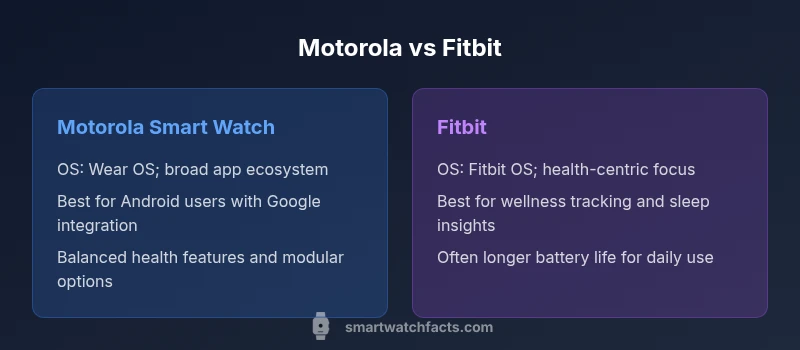
Motorola smart watch vs Fitbit pits a broad, Android-friendly wearable against a health-focused tracker with a simplified app ecosystem. Motorola leans on Wear OS for quick Google integration and broad third‑party support, while Fitbit emphasizes wellness features and long-term battery life for casual users. This comparison highlights OS, sensors, battery life, pricing, and overall value.
motorola smart watch vs fitbit: Market positioning and buying context
In the crowded wearable market, choosing between Motorola smartwatches and Fitbit devices often hinges on how you intend to use the device daily. If you live in Google's ecosystem and value a broad app library, Motorola’s Wear OS-based options can feel natural and fast. If your priority is simple, reliable health metrics and long battery life, Fitbit models tend to shine. This article sets the stage for a deeper dive into what each brand brings to the table and why your choice matters for everyday life. According to Smartwatch Facts analysis, the brand you pick usually aligns with how you interact with apps, notifications, and wellness insights. In motorola smart watch vs fitbit terms, we compare OS and app ecosystems, sensors and health features, battery life, pricing, and long-term value to help you decide with confidence.
Design and comfort: form factor, materials, and display
The physical feel of a watch shapes how often you wear it. Motorola devices tend to emphasize a robust, contemporary silhouette with larger displays designed for quick glances during workouts or commutes. Fitbit models often favor a lighter, slimmer profile that blends with casual wear, using materials chosen for all-day comfort. Display quality, bezel size, and strap interchangeability matter not just for aesthetics but for durability and daily usability. In practice, model choice affects readability in bright sunlight, comfort during sleep, and how easily you can swap bands to match outfits. We examine weight, thickness, screen technology, and strap flexibility to help you decide which design suits your lifestyle.
Operating system, apps, and compatibility
Motorola's smartwatch lineup runs on Wear OS, offering a broad app ecosystem, Google services, and faster access to maps, Assistant, and notifications. Fitbit devices use Fitbit OS, prioritizing health metrics, sleep insights, and guided workouts. The depth of each ecosystem matters: Wear OS supports many third-party apps, customizable watch faces, and better integration with Google services, while Fitbit OS centers on wellness and activity coaching with a more curated app catalog. Compatibility with smartphones also plays a big role: Android users typically experience the smoothest integration, but iPhone users can still use both brands for core features. This section contrasts app availability, voice assistant support, and smartwatch functions to help you gauge which environment feels more intuitive for you.
Health and fitness tracking capabilities
Both brands deliver strong health tracking, yet their emphasis diverges. Motorola watches offer core metrics like heart rate, activity tracking, and GPS-based insights, with an emphasis on real-time data and ecosystem integration. Fitbit emphasizes wellness tracking, sleep stages, daily readiness scores, and guided workouts, often delivering deeper sleep analysis and fitness coaching. Sensor quality and GPS accuracy can vary by model, but the overall approach matters: Motorola favors breadth through app integrations, while Fitbit prioritizes depth of health insights. This section compares heart-rate sensors, sleep tracking, activity recognition, guided workouts, and how data is presented in companion apps.
Battery life, charging, and durability
Wear OS-powered Motorola models balance performance with power demands; battery life depends on screen brightness, always-on display usage, and app activity. Fitbit devices are often optimized for sustained wellness tracking and can offer longer daily endurance in typical usage, especially when high-power features are limited. Durability includes water resistance and screen protection, with ratings varying by model. In daily life, GPS use during runs or streaming music can shorten a watch’s day. Here we outline general expectations and practical tips to maximize battery life, such as adjusting display settings, managing notifications, and selecting models that harmonize with your charging routine.
Connectivity, notifications, and smart features
Both platforms support core smartwatch capabilities: calls, texts, notifications, and app integrations. Motorola Wear OS watches often deliver richer notification handling and quick access to Google apps, with potential performance advantages from hardware optimization. Fitbit devices focus on health-centric interactions, with reminders, guided workouts, and a simplified notification experience. Some models include GPS, music control, and contactless payments; feature availability depends on the model and region. We discuss notification management, app customization, and how to balance the flow of information so you stay informed without feeling overwhelmed.
Pricing, bundles, and long-term value
Motorola watches generally occupy the mid-to-high end of the market, reflecting hardware, Wear OS capabilities, and Google ecosystem advantages. Fitbit devices typically cover a broad mid-range with frequent promotions and bundles tied to premium app access. Price alone doesn’t determine value; long-term experience, software updates, ecosystem depth, and customer support shape total cost of ownership over 1–2 years. This section outlines strategies for evaluating price in context—look for sales, bundled accessories, and warranty terms that improve long-term value.
Real-world usage scenarios: who should buy which
Android-heavy households or users who rely on Google services often find Motorola watches to be a natural extension of their phone. If your main goal is precise health insights, sleep quality, and activity coaching, Fitbit devices tend to be the better choice. We explore practical scenarios—commuting, workouts, sleep analysis, family device sharing—and map them to each brand’s strengths, so you can visualize how each option would feel in your daily routine.
Buying checklist: how to decide between Motorola and Fitbit
Create a checklist of must-haves: OS openness, app ecosystem breadth, health metric depth, battery expectations, price tolerance, and smartphone compatibility. Consider how you will wear the device daily, what apps you plan to use, and whether you need advanced features like Google Maps or voice assistants. This final section delivers a step-by-step decision guide you can apply before making a purchase.
Comparison
| Feature | Motorola Smart Watch | Fitbit |
|---|---|---|
| Operating System & App Ecosystem | Wear OS-based platform with broad app support | Fitbit OS with wellness focus and a smaller app ecosystem |
| Health & Fitness Tracking | Strong health metrics, GPS, and Google integration | Deep wellness metrics, sleep insights, and guided workouts |
| Battery Life & Charging | Balanced endurance; optimized by usage | Typically longer endurance for everyday wellness use |
| Compatibility (Android/iPhone) | Best with Android; strong iPhone support for core features | Excellent on both; some features limited on iPhone |
| Design & Comfort | Robust, modern design with larger displays | Lightweight, slim profile aimed at daily wear |
| Price Range & Value | Mid-to-high depending on model; value tied to ecosystem | Mid-range pricing with emphasis on health features |
| Water Resistance | Model-dependent ratings; generally suitable for daily wear | Model-dependent; designed for daily activity and workouts |
Strengths
- Broad app ecosystem and Google services integration for Motorola
- Strong health metrics and wellness coaching for Fitbit
- Good Android-to-watch pairing; flexible notifications with Wear OS
- Balance of features with reasonable price in modern models
Weaknesses
- Wear OS can be power-hungry with heavy app use
- Fitbit OS has a smaller third-party app catalog
- Some features may be limited on iPhone compared to Android
Choose Motorola for Android-strong users; choose Fitbit for wellness-focused wearers
Motorola wins on app breadth and Google integration; Fitbit wins on health data depth and battery life in typical wellness use.
People Also Ask
Which is better for Android users, Motorola smart watch or Fitbit?
For Android users, Motorola watches generally offer deeper OS integration and broader app support, while Fitbit emphasizes health metrics with a simpler app experience. Your choice depends on whether you want Google services and apps or wellness-focused features.
Android users often prefer Motorola for better app support, while Fitbit is strong for health tracking.
Do Motorola watches run Wear OS and are they compatible with iPhone?
Yes, most Motorola watches run Wear OS, providing access to Google apps and notifications. They are compatible with iPhone for core features, but some capabilities may be limited compared to Android.
They use Wear OS and work with iPhone for basics, but full integration shines on Android.
Can Fitbit watches track sleep, heart rate, and workouts accurately?
Fitbit devices are well-regarded for sleep tracking and heart-rate sensing, with reliable activity insights for everyday users. Accuracy can vary with activity type and wearing position, but Fitbit generally provides strong wellness data.
Fitbit tracks sleep and heart rate well for everyday use, though accuracy can vary by activity.
Are price ranges comparable between Motorola and Fitbit?
Prices vary by model and region. Motorola watches typically sit in the mid-to-high range, while Fitbit models cover mid-range with frequent promotions. Consider total cost of ownership, including software access and warranty.
Prices differ by model and sales, but both brands offer solid mid-range options.
Which brand offers longer battery life?
Battery life depends on usage. Fitbit devices often deliver longer endurance for wellness-focused use, whereas Wear OS devices may drain faster with heavy app activity. If battery life is paramount, Fitbit is usually favorable.
If battery life is your main concern, Fitbit tends to last longer in daily wellness use.
Key Points
- Define your primary use: apps vs health metrics
- Assess ecosystem alignment: Google vs Fitbit OS
- Expect variable battery life by usage pattern
- Check compatibility with your smartphone
- Watch for bundles and software update reliability