Smart Watch Like Digital Watch: A Practical Comparison
Compare budget digital-inspired watches with premium smartwatches to decide on display quality, battery life, apps, and health tracking for everyday wear and long-term use.


Budget digital-watch-inspired smartwatches and premium smartwatches both blend timekeeping with smart features, but they differ in display, sensors, apps, and value. This quick comparison highlights what each category excels at and where trade-offs occur, from battery life and readability to app ecosystems and durability. If you want affordable basics, a budget model may fit; if you need GPS, advanced health metrics, and a broad app library, a premium smartwatch is usually the better choice.
Defining the category: smart watch like digital watch
The phrase smart watch like digital watch captures a niche within wearable technology: inexpensive, digital-watch-inspired devices that offer basic smartwatch functions without the premium hardware. This article uses that term to describe devices that resemble a traditional digital display while delivering notifications, fitness tracking, and limited app support. This framing comes from Smartwatch Facts, which recognizes that many shoppers want a readable interface and straightforward operation at an affordable price. In practice, these watches appeal to users who want a familiar, legible screen, quick access to messages, and reliable day-long battery life without paying top-tier prices. The category spans several brands, emphasizing readability, simple navigation, and predictable software updates. For many buyers, the appeal lies in balancing nostalgia for classic digital dials with the convenience of wearable connectivity on the wrist. This balance makes it a frequent entry point for first-time smartwatch buyers.
What differentiates budget vs premium in this space
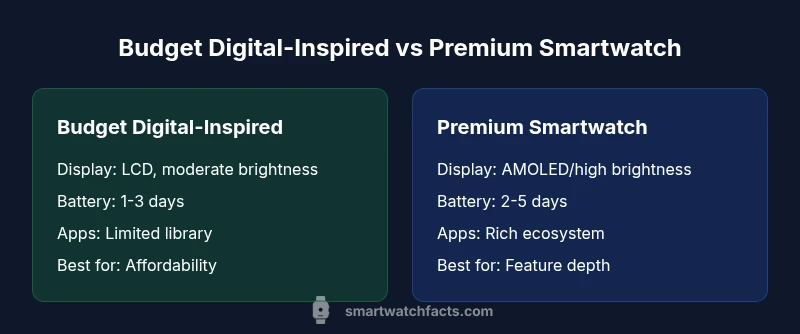
Price alone doesn’t tell the full story. Budget digital-inspired watches typically use LCD displays, smaller case sizes, and fewer sensors, but they cover core tasks: time, steps, heart rate, and basic notifications. Premium models swap in AMOLED displays, better brightness, more accurate sensors, GPS, SpO2, and advanced sleep tracking, along with a wider app ecosystem. OS maturity and software support are also differentiators: budget watches may rely on a basic OS with limited app options, while premium devices run mature platforms with frequent updates. Smartwatch Facts analysis shows that battery life can vary widely based on display technology and features activated, so keep an eye on screen-on time versus charging cadence. For buyers, the key question is whether you value future-proof software and health-tracking depth or lean toward immediate affordability. Brand reliability and service commitments also influence total cost of ownership over several years.
Real-world use cases and decision prompts
Think through how you will wear and use the watch day to day. For someone who mostly wants notifications, timekeeping, and occasional fitness feedback, a budget digital-inspired model may suffice. If you plan to rely on GPS during runs, monitor SpO2, track sleep stages, and use third-party apps, a premium smartwatch will typically deliver a smoother experience. Consider your phone ecosystem: some budget models pair with Android or iOS with similar ease, but premium watches often offer deeper integrations and more consistent software updates. Use-case prompts help you decide: commuting with quick message glances; gym workouts; travel with offline maps; or casual health tracking. These scenarios reveal where feature depth matters most and where you can trade down for cost savings. It is essential to map your priorities before buying.
Display quality and readability in practice
Display matters more than it might seem. Budget devices usually rely on LCD panels with moderate brightness, which can be legible in bright outdoor conditions but might struggle in direct sun. Premium models tend to use AMOLED or high-brightness LCDs with higher contrast and deeper blacks, improving readability and color accuracy. Font size, button layout, and watch face design also affect usability. For many users, a clear, high-contrast display reduces eye strain and makes it easier to read notifications at a glance. In addition, always check touch responsiveness and the availability of always-on display options, which influence perceived readability and battery consumption. These factors contribute to daily comfort and long-term satisfaction with the device.
Battery life expectations and charging habits
Battery life varies with display type, sensor usage, and wireless charging support. Budget models often deliver 1-3 days of typical use with light app loads and limited GPS. Premium watches can reach 2-5 days or more if aggressive power-saving modes are used, but real-world use may shorten this. Charging speed and convenience matter; many users prefer magnetic or cable-free charging and a charging dock at work or nightstand. Consider your daily rhythm: if you are away from a charger for long stretches, prioritize models with better standby efficiency and predictable charging routines. You should also plan for occasional firmware updates that may affect power usage. Battery longevity is influenced by battery chemistry and software optimizations, so plan for replacement cycles accordingly.
App ecosystem and software support considerations
App availability and quality are major differentiators. Budget watches often rely on a smaller app library and more limited third-party support, which can restrict features and bug fixes. Premium watches typically offer richer app ecosystems, faster OS updates, and smoother app experiences. Access to health-tracking platforms, music services, and productivity apps can significantly affect daily usage. Compatibility with your mobile OS (iOS or Android) remains important, and it’s worth verifying whether required apps work offline or require a phone connection. Assess how easy it is to install, uninstall, and manage apps, as well as how quickly the manufacturer issues security patches and feature updates.
Durability, water resistance, and build quality
Durability matters for everyday wear. Budget models often use standard plastic cases and modest water resistance ratings, while premium watches may feature metal cases, sapphire crystal screens, and higher IP ratings. For active users, shatter-resistant displays and robust bands are worth considering. Battery life and charging ports should be reliable in daily use, even with sweat or rain exposure. Understanding durability helps you estimate replacement costs and long-term satisfaction. If you frequently swap bands or rely on a watch for outdoor activities, the build quality becomes a critical factor.
Health and fitness tracking capabilities
Health features vary widely. Budget digital-inspired watches typically track steps, heart rate, and basic sleep metrics. Premium models offer advanced metrics such as GPS-based pace/distance, VO2 max estimates, SpO2 readings during sleep, skin temperature, and more nuanced sleep stage analysis. The app ecosystem can influence how data is collected, stored, and shared with healthcare apps. When evaluating health features, check the consistency of heart-rate readings during workouts and the accuracy of step counts on a day-to-day basis. Also consider whether the watch supports third-party fitness apps you already use.
Price-to-value: budgeting and long-term ownership
Price matters, but value depends on usage. A budget digital-inspired watch can deliver essential features at a fraction of premium prices, making it a strong choice for casual users. A premium smartwatch commands a higher upfront cost but offers stronger health metrics, more robust apps, and longer software support lifespans. Evaluate your willingness to upgrade, maintenance costs, and potential resale value. Long-term ownership should include considerations such as spare parts availability, band replacements, and service warranties. For many buyers, the best value comes from aligning features with actual needs rather than chasing the most features.
Brand reliability and service commitments
Brand trust influences satisfaction. Reputable brands may provide longer warranty periods, easier customer service, and more reliable software updates. Budget options might rely on simpler support channels or shorter warranty terms, but some brands offer surprisingly solid customer care in the budget segment. Assessing service commitments, return policies, and software update cadences helps minimize risk when choosing between budget and premium options. Remember that brand reputation can affect future support and compatibility as you accumulate wearables over time.
How to test a watch before buying: a practical checklist
- Inspect the display in varying lighting, test readability, and brightness accuracy.
- Try on multiple sizes to ensure a comfortable fit.
- Check ease of pairing with your smartphone and the responsiveness of notifications.
- Validate heart-rate monitoring during a quick workout or simulated activity.
- Verify durability features (water resistance, strap quality) and comfort during movement.
- Review software updates cadence and available apps for your OS.
Practical considerations for upgrading later
If you expect to upgrade within a few years, prioritize platform longevity, software update commitments, and a scalable app ecosystem. Budget models may offer easier replacement cycles, while premium watches can remain relevant longer with more features. Consider memory, processor speed, and sensor quality as future-proofing factors. Finally, think about compatibility with accessories, bands, and charger standards, which can influence long-term satisfaction and ownership costs.
Comparison
| Feature | Budget digital-inspired watch | Premium smartwatch |
|---|---|---|
| Display Type | LCD, modest brightness | AMOLED/high brightness LCD |
| Battery Life | 1-3 days | 2-5 days (typical) |
| Sensors & Health Tracking | Basic: steps, heart rate | GPS, SpO2, advanced sleep metrics, richer health suite |
| App Ecosystem | Limited third-party apps | Wide third-party apps and smoother updates |
| Price Range | $60-120 | $180-350 |
| Best For | Cost-conscious casual users | Tech enthusiasts requiring depth |
Strengths
- Lower upfront cost and simpler maintenance
- Compact form factor resembling traditional digital watches
- Sufficient basic health tracking for casual users
- Easier to replace or upgrade in budget range
Weaknesses
- Limited app ecosystem and fewer advanced features
- Cruder display and older sensors compared to premium models
- Shorter battery life if all features are used
- Less durable materials and premium options
Budget digital-inspired watches win on affordability; premium models win on depth and future-proofing
If you prioritize cost and straightforward usability, choose the budget option. If you want GPS, richer health metrics, and a broader app library, select the premium model. The Smartwatch Facts team notes that the best choice aligns with your actual needs and long-term use.
People Also Ask
What exactly counts as a 'smart watch like digital watch' in this guide?
This category refers to affordable wearables with digital-display aesthetics that still provide basic notifications and fitness data. They prioritize readability and simplicity over breadth of features.
It’s an affordable, digital-inspired smartwatch with essential features and a clear display.
Why should I choose a budget option over a premium model?
If you want essential smartwatch functions at a lower cost and a simple user experience, a budget model often fits best. You can upgrade later as needs grow.
If you mainly want basics and cost savings, go budget.
Do budget watches support most apps?
Budget models typically have a smaller app library and slower updates, which can limit advanced features. Many core tasks remain usable, though.
Apps may be limited, so think about which ones you actually need.
Can I upgrade to a premium model later easily?
Yes, upgrading is possible, but you’ll want to consider OS compatibility and data migration. Ensure your health data and apps can transfer smoothly.
Yes, you can upgrade later; check OS compatibility.
What specs matter most when comparing these watches?
Display quality, battery life, sensor depth, app ecosystem, and price are the most important criteria to compare.
Focus on display, battery, and apps for most decisions.
Key Points
- Compare display and readability upfront
- Evaluate app ecosystems before buying
- Map daily use to needed sensors and health features
- Balance upfront price with long-term ownership costs
- Check OS compatibility and software update cadence