Smart Watch Sensor Burn: Urgent Troubleshooting Guide
Urgent troubleshooting guide to diagnose and prevent smart watch sensor burn. Learn quick fixes, safety steps, and practical prevention tips to protect skin and device.


Notice unusual heat near a smartwatch sensor? This is a potential smart watch sensor burn risk. Immediate steps: power off safely if possible, remove the watch from your wrist, and allow it to cool away from direct heat. Do not charge if the device feels hot. Update software and consult support if overheating recurs. Delaying professional assessment can worsen the risk.
Understanding smart watch sensor burn and risks
Smart watch sensor burn is a real safety concern when sensors near the skin overheat. Modern wearables rely on optical sensors and other sensing technologies that run continuously during daily use. In rare cases, heat buildup can cause discomfort or skin irritation, and in extreme situations it may affect battery health. According to Smartwatch Facts, heat issues most often originate from power management faults, software bugs, or charging in hot environments. Recognizing early signs—an unusual warm sensation on the wrist, a visible heat glow on the watch, or a notification that the device is operating in a high-heat state—can prevent escalation.
Key takeaway: Heat symptoms may be subtle at first; treat them seriously to protect skin and electronics.
How heat builds up in wearables and why sensors matter
Wearables generate heat as the CPU, sensors, and radio modules process data. The skin-contact area is a tight enclosure, so even small heat increases can feel amplified. Common heat pathways include battery management, sensor data processing, and charging circuitry. Environmental factors like direct sun, high room temperatures, and heavy workouts can compound the problem. Prolonged heat exposure can lead to discomfort or skin irritation, and persistent overheating may shorten device lifespan. Understanding these pathways helps you intervene early and safely.
Practical note: Avoid wrapping the watch tightly around the wrist if you notice heat buildup; this can trap heat and worsen symptoms.
Safety first: immediate actions if you suspect a burn or overheating
If your watch feels hot or shows signs of excessive warmth, take quick, cautious steps. Do not ignore heat; power off the device if safe, and remove it from the wrist to cool on a non-flammable surface. Move away from direct sunlight or heat sources, and do not attempt to charge the device while it is hot. If skin shows redness or blistering, seek medical advice. After cooling, check for firmware updates and test with a basic usage scenario to see if the heat recurs.
Note: Do not put a hot device in cold water or use ice directly on the skin; rapid temperature changes can cause additional skin or material damage.
Quick home checks that can reduce heat generation
Begin with simple, non-invasive checks before diving into deeper diagnostics:
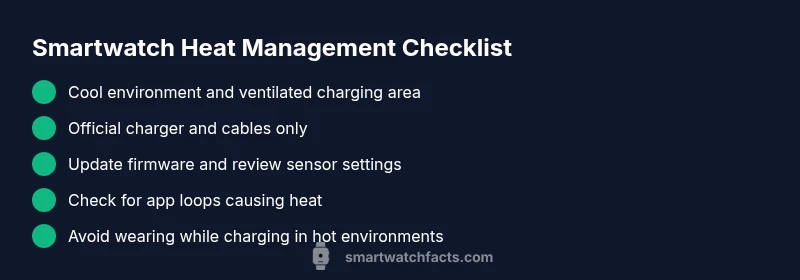
- Inspect the environment: avoid charging in hot rooms or under direct sun.
- Check the charging setup: use the original charger and avoid third-party accessories that may cause extra heat.
- Look for software issues: ensure you are on the latest firmware and that no apps are stuck in loops.
- Observe wrist comfort: remove jewelry or tight bands that may trap heat and irritate skin.
If anything feels off, pause use and consider safe alternatives until you have resolved the heat source.
Diagnostic flow: symptom to diagnosis in 4 steps
A systematic approach helps isolate the cause without guesswork. Start with basic checks and move toward targeted fixes.
Symptom: Your wrist becomes noticeably warm during wear, with or without heavy activity.
Causes (likelihood):
- Overactive CPU/firmware loop causing high power draw — high
- Battery fault leading to excessive heat — medium
- Charging in hot environment or damaged charging cable — low
Fixes (difficulty):
- Stop wearing the watch and power down; move to a cooler area — easy
- Update firmware and reset energy-hungry apps — easy
- Check charging environment and replace charger if damaged — easy
This flow helps you decide if the issue is likely software-related, hardware-related, or external.
Step-by-step fixes for the most common causes
- Power down and remove the watch: Safely shut down the device and take it off your wrist to stop heating immediately. Tip: Do not attempt to force a charge while hot.
- Move to a cool environment: Place the watch on a cool, flat surface away from sunlight and heat sources. Tip: Keep it elevated so air can circulate around the case.
- Inspect the charger and port: If you charge the watch, disconnect and inspect the charger and cable for damage. Replace with the original accessory if you suspect wear. Tip: Use the charging dock in a ventilated area.
- Update firmware and apps: Reconnect to your phone and check for available firmware updates. Install any updates and reboot the watch. Tip: Close background apps that may cause continuous processing.
- Check sensor and health settings: Review sensor configurations (HR, SpO2, etc.) and disable nonessential features temporarily to reduce load. Tip: Reset to default if settings became corrupted.
- Consider a factory reset if heat persists after updates: Back up data, perform a reset, and restore only essential apps. Tip: After reset, reintroduce apps slowly to isolate culprits.
- Re-test performance with light usage: After a cooling-down period, perform a short walk with basic features enabled to see if heat recurs. Tip: Monitor ever-present heat by touching the band periodically to gauge changes.
- Document and contact support: If heating returns, collect device logs, timestamps, and temperatures and contact support. Tip: Keep your purchase receipt and warranty details handy.
- Reflection and next steps: If the device remains warm after steps, do not continue using it during activities; seek professional assessment.
Estimated total time: 45-60 minutes.
Tips & warnings: safe handling and common mistakes
- Always power down before inspecting hardware; never disassemble a smartwatch yourself.
- Do not place a hot device in the fridge or freezer; rapid temperature shifts can damage components and skin.
- Avoid charging on soft surfaces like beds or couches that trap heat.
- If you notice skin irritation, remove the device immediately and seek medical advice.
- Use only official charging accessories; third-party parts may introduce heat or faults.
Prevention: long-term strategies to avoid future overheating
- Keep firmware updated; manufacturers fix thermal management issues via updates.
- Avoid exposing the watch to high ambient temperatures for extended periods.
- Manage battery health by avoiding deep discharges and performing occasional resets if supported by the OS.
- Use energy-saving modes during workouts to reduce heat generation.
- Regularly inspect charging accessories for wear and replace if damaged.
Choosing a smartwatch with better heat management
When shopping, consider watches with robust thermal management, efficient processors, and software that throttles background tasks during idle periods. Look for devices with good-worded safety features and clear heat indicators in the OS. Read reviews focusing on heat performance and customer experiences.
Skin safety and long-term health considerations
Prolonged exposure to excess heat can irritate skin and potentially affect underlying tissues. If you consistently experience heat, consider shorter wear sessions or alternate devices until you determine a safe operating profile. Maintain good wrist hygiene, avoid applying lotions that increase irritation under heat, and monitor for any lasting skin changes.
Steps
Estimated time: 45-60 minutes
- 1
Power down and remove the watch
Safely shut down the device and take it off your wrist to stop heating immediately. Do not force a charge while hot.
Tip: Do not attempt to force a charge while hot. - 2
Move to a cool environment
Place the watch on a cool, flat surface away from sunlight and heat sources to allow the casing to dissipate heat.
Tip: Keep it elevated so air can circulate around the case. - 3
Inspect the charger and port
If you charge the watch, disconnect and inspect the charger and cable for damage. Replace with the original accessory if worn.
Tip: Use the charging dock in a ventilated area. - 4
Update firmware and apps
Reconnect to your phone and check for available firmware updates. Install updates and reboot.
Tip: Close background apps that may cause continuous processing. - 5
Check sensor and health settings
Review sensor configurations (HR, SpO2, etc.) and disable nonessential features to reduce load.
Tip: Reset to default if settings became corrupted. - 6
Factory reset if heat persists
Back up data, perform a reset, and restore essential apps only to identify culprits.
Tip: After reset, reintroduce apps slowly to isolate causes. - 7
Retest with light usage
After cooling, perform a short workout with basic features to see if heat recurs.
Tip: Monitor heat by touching the band periodically. - 8
Document and contact support
If heating returns, collect logs, timestamps, and temperatures and contact support.
Tip: Keep purchase receipt and warranty details handy. - 9
Plan next steps
If device remains warm after steps, avoid further use during activities and seek professional assessment.
Tip: Safety first—don’t ignore persistent heat.
Diagnosis: Wrist warms significantly and device feels hot during wear
Possible Causes
- highOveractive CPU/firmware loop causing heavy power draw
- mediumBattery fault leading to excessive heat
- lowCharger or charging cable in heat source or faulty charging
Fixes
- easyStop wearing the watch and power it down; move to a cool place
- easyUpdate firmware and reset energy-hungry apps
- easyCheck charging environment and replace charger if damaged
People Also Ask
Can a smartwatch burn my skin from overheating?
Yes, if a device overheats, it can cause skin irritation or burns. Stop wearing the watch and cool it down before further use. If redness or blistering occurs, seek medical advice.
Yes. If it overheats, remove the watch and cool it. Seek medical advice if irritation occurs.
Is sensor overheating dangerous for the device itself?
Prolonged overheating can degrade battery health and reduce sensor accuracy. Always address persistent heat and avoid charging in hot environments.
Yes, overheating can harm the battery and sensors; address it promptly.
Will software updates fix overheating?
Software updates can fix energy management issues that cause heat. Ensure the device is on the latest firmware and reset any heat-causing settings if recommended by the manufacturer.
Software updates can help if the issue is due to power management.
Should I continue using the watch during workouts if it feels warm?
No. If it feels warm, stop using it and allow it to cool. Prolonged use while hot can worsen skin irritation and device stress.
No—stop and cool it down before resuming.
Does warranty cover heat damage?
Warranty policies vary by brand and region. Check the terms for heat-related issues and document any overheating events when you contact support.
Warranty coverage varies; check terms and document overheating events.
When should I seek professional help?
If overheating recurs after following troubleshooting steps, stop using the device and contact manufacturer support for diagnostic services or repair options.
Seek professional help if heat keeps coming back.
Watch Video
Key Points
- Power down and cool the device at first sign of heat.
- Update firmware and minimize background processing.
- Use only official charging equipment and ventilated areas.
- If heat persists, seek professional evaluation and warranty support.
- Prevent heat with proper charging, environment, and wear practices.