Why Does My Smart Watch Get Hot When Charging? Fixes, Safety, and Prevention
Discover why your smartwatch heats up during charging and learn practical, no-nonsense fixes to keep your device safe, cool, and ready to wear.


Most smartwatches heat up during charging due to high charging power, ambient heat, or degraded batteries. Start with the original charger on a cool, flat surface, then restart the watch and check for firmware updates. If the heat persists after a few minutes, stop charging and contact support. This quick sequence helps prevent battery damage and safety risks.
Understanding Why Heat Occurs While Charging
Charging a smartwatch involves moving energy into a compact lithium-ion battery. This process inevitably creates some heat, but excessive warmth can signal mismatched power, battery wear, or environmental factors. The device, its charger, and the surrounding temperature all influence how hot it gets. When charging, aim for a cool room and a stable surface, and avoid wrapping the watch against your skin or placing it under heavy fabrics that trap heat. If you notice a sharp rise in temperature or a burning smell, discontinue charging immediately. Smartwatch Facts emphasizes that simple, safe steps now can prevent long‑term battery degradation and safety risks down the line.
Common Causes of Overheating During Charging
Overheating can stem from several overlapping causes. A faulty or non‑standard charger can push more current than the watch expects. A damaged or frayed cable, bad magnetic alignment on wireless chargers, or charging on a soft surface that blocks heat dissipation can all contribute. Battery age also matters: older cells lose efficiency and generate more heat under load. Finally, ambient conditions like a hot room or direct sunlight can compound the effect. Each factor varies by model, but the underlying rule is the same: high power + poor heat dissipation = heat buildup.
How to Safely Inspect Your Charger, Cable, and Watch
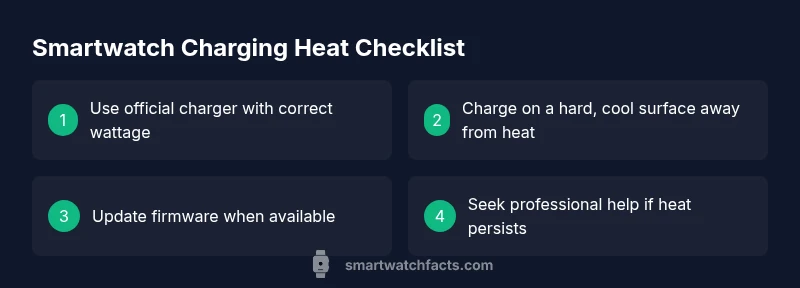
Begin with tactile and visual checks: inspect the charging puck or cradle for cracks, loose parts, or corrosion. Use the original charger or a certified replacement with the correct wattage for your model. Inspect the cable for kinks or exposed wires and replace if damaged. Place the watch on a hard, cool surface away from heat sources, fabrics, or direct sun. Remove any watch bands or cases that could trap heat near the back of the case. Finally, ensure your watch software is up to date, as some updates include battery management improvements that reduce heat during charging.
Diagnostic Flow: Symptom → Diagnosis → Solutions
If the watch gets hot while charging, start with the simplest checks: charger compatibility, surface, and ventilation. If heat remains, consider battery health and software behavior. The hierarchy is: (1) hardware compatibility, (2) heat dissipation, (3) battery age, (4) software. Each stage has concrete fixes you can apply before seeking professional help. Remember, safety first: if you smell burning or see swelling, stop using the charger and contact support immediately.
Step-By-Step Troubleshooting for Most Watches
- Stop charging and cool down the watch for 10–15 minutes. 2) Switch to the original charger on a flat, hard surface away from heat sources. 3) Reconnect and monitor for 5–10 minutes; if no heat, proceed to update firmware. 4) Reboot the watch and check battery health in the settings. 5) If heat recurs, try a different outlet or charging pad. 6) If persistent, contact customer support for diagnostic or battery replacement guidance.
Safety First: What Not to Do
Do not leave a hot watch unattended on a bed or pillow, which can trap heat and cause burns. Avoid charging in direct sunlight or in a car on a hot day. Do not use third‑party chargers with dubious compatibility. Never attempt to open or modify the battery. If any abnormal odor, smoke, or swelling appears, discontinue use and seek professional help immediately.
Long-Term Solutions and Best Practices
Develop a routine that minimizes heat generation during charging. Use official or certified chargers with appropriate wattage, keep charging away from direct heat sources, and avoid charging under heavy phone usage that draws extra power from the device. Periodically calibrate the battery through proper discharge/charge cycles if recommended by the manufacturer. Consider replacing an older watch battery when heat episodes become frequent, and always install software updates promptly to improve heat management.
Steps
Estimated time: 20-40 minutes
- 1
Cool the device
Unplug the charger and place the watch on a cool, flat surface. Let it cool for 10–15 minutes before testing again.
Tip: Do not cover the back of the watch while cooling. - 2
Check the charger
Inspect the charger, cable, and port for wear or damage. Reconnect using the original charger or a certified alternative with the correct wattage.
Tip: If the charger gets unusually warm during inspection, replace it. - 3
Test on a safe surface
Place the watch on a hard, cool surface and begin a short charging test in a controlled environment.
Tip: Avoid charging on a bed, pillow, or fabric that traps heat. - 4
Update software
Check for and install any available firmware updates, as they can improve charging efficiency and heat management.
Tip: Back up data if required before a system update. - 5
Try a different outlet
If you use a wall adapter, try another outlet or a USB-C port with appropriate power delivery.
Tip: Power delivery standards vary by device; mismatch can cause heat. - 6
Know when to seek help
If the watch continues to heat abnormally, discontinue use and contact the manufacturer or a service center for a battery diagnostic.
Tip: Persistent heat may indicate a battery issue that needs replacement.
Diagnosis: Smartwatch gets hot while charging
Possible Causes
- highIncompatible or faulty charger drawing excessive current
- mediumAmbient heat or charging on a soft surface blocking heat dissipation
- mediumOld or degraded battery causing inefficiencies during charging
- lowSoftware issues causing high CPU load during charging
Fixes
- easyUse the original charger and a certified cable compatible with the watch model
- easyCharge on a hard, cool surface away from heat sources and direct sunlight
- easyRestart the watch and check for firmware updates or battery health diagnostics
- mediumIf overheating persists, contact support for battery or hardware diagnostics
People Also Ask
Why is my smartwatch overheating only when charging?
Overheating during charging is usually due to high charging power from an incompatible charger, a degraded battery, or a hot environment. Start with the simplest fixes: switch to the official charger, ensure good ventilation, and update the software. If heat continues, seek professional diagnostics.
Overheating during charging is often caused by charger or battery issues. Start with the official charger and software updates, and seek help if the heat persists.
Can using a non-original charger cause overheating?
Yes. A non-original or damaged charger can push improper current, causing excess heat. Always use the manufacturer’s charger or a certified alternative with the exact wattage for your model.
Using an uncertified charger can cause heat. Stick to official or certified chargers with the right wattage.
Should I keep charging if the watch feels hot?
No. If the watch feels hot, stop charging and allow it to cool. Check charger condition, ventilation, and firmware before attempting again.
If it’s hot, stop charging and let it cool before trying again.
Is overheating dangerous for the battery?
Excessive heat can accelerate battery wear or cause swelling over time. It’s best to diagnose the cause and limit exposure to heat, especially during charging.
Persistent heat can damage the battery, so diagnose the cause and minimize heat exposure.
Can firmware updates affect charging heat?
Yes. Updates can improve battery management and heat dissipation. Keep your watch updated to reduce overheating risks.
Firmware updates can help reduce charging heat; keep your device updated.
When should I seek professional service?
If heat returns after trying the recommended fixes or if you notice swelling, odors, or damage, contact the manufacturer’s support or a certified service center.
If heat persists or you see damage, seek professional service.
Watch Video
Key Points
- Start with safe, simple checks and official chargers
- Identify whether heat comes from charger, battery, or environment
- Update firmware to improve heat management
- If heat persists, seek professional diagnostics
- Adopt ongoing habits to minimize heat during charging