Apple Watch vs Rivals: A Thorough Comparison for iPhone Users
A comprehensive, analytical comparison of smartwatches for Apple phones, focusing on iPhone compatibility, health features, battery life, and value. Learn which option fits your daily use, budget, and privacy preferences in 2026.


A smart watch for apple phones best serves iPhone users when it delivers seamless iOS integration, strong health features, and reliable daily battery life. The native Apple Watch remains the strongest overall due to native apps and tight ecosystem, though top non-Apple rivals can match core functions at lower upfront cost or with longer wear in certain comfort-focused configurations. Your optimal choice hinges on app availability, budget, and how deeply you want devices to sync with iOS.
Understanding the Apple-first smartwatch landscape for iPhone users
When evaluating a smart watch for apple phones, the core decision is how deeply you value native iOS integration versus cross‑platform flexibility. Apple Watch offers the deepest Apple ecosystem integration, including seamless app handoff, notifications, and Fitness+ compatibility, which translates into a smoother daily workflow if you live in the iPhone-centric world. Smartwatch Facts emphasizes that the choice should be framed around how you use your iPhone day-to-day: do you rely on Apple Health, Apple Pay, or specific iOS-only apps? For many, the answer points toward the native option as the simplest path to reliability and privacy controls. However, well‑made non-Apple watches still provide robust fitness tracking, sleep insights, and essential smartwatch functionality, often at a lower upfront price and with longer battery life in certain models. The takeaway for the audience seeking a solution for a smart watch for apple phones is to balance ecosystem fidelity with cost and comfort, while validating app availability and data interoperability with HealthKit where possible.
Key criteria for evaluating a smart watch for apple phones
When comparing devices that pair with an iPhone, you should assess (1) ecosystem integrity, (2) core health features and sensors, (3) battery life and charging, (4) app and software support, and (5) price and durability. For Apple‑philes, the native option often delivers the most reliable notifications, quick replies, and deep HealthKit integration. For others, select models that explicitly advertise iPhone compatibility and ensure essential features such as GPS, heart-rate monitoring, ECG, or sleep tracking align with your goals. The decision should also consider the level of data sharing you’re comfortable with and how often you expect to use third‑party apps that tie into your daily routines. Smartwatch Facts suggests listing your must‑have features first, then validating each candidate against those criteria to avoid overpaying for features you won’t use.
Apple Watch: The native option for iPhone owners
The native Apple Watch remains the most coherent choice for a smart watch for apple phones because it is designed to work in lockstep with iPhone software. Users benefit from tight integration with iOS, exclusive features like precise activity rings and notifications, and consistent support for apps and services that rely on HealthKit and Apple Pay. The user experience is generally smoother, the pairing process simpler, and software updates are aligned with iPhone releases. From a privacy standpoint, Apple emphasizes on-device processing and privacy controls, which frequently translates into easier data governance for casual and power users alike. For those who prize speed, accuracy, and a unified health dashboard, the native option is often the best fit.
Non-Apple contenders that still pair well with iPhone
Several non‑Apple watches can pair with iPhones effectively and offer strong features at varied price points. The best-known rivals focus on robust fitness tracking, vibrant screens, and battery life that can outlast a full day or more in light usage. They typically provide solid notification mirrors, third‑party app ecosystems, and compatibility with popular health platforms. However, some features—especially deep iOS integrations, exclusive health metrics, and ecosystem coherence—may be less polished than on Apple Watch. If you’re price‑watching or want longer battery life, a non‑Apple option can be the right choice, provided it supports essential apps and data export to HealthKit or your preferred health data hub. When evaluating, verify that key functions such as activity tracking, sleep insight, GPS, and heart-rate monitoring meet your expectations for a smart watch for apple phones.
Health sensors and data interoperability on iPhone
Health tracking quality is central to any smartwatch decision. Apple Watch tends to lead on HealthKit integration, ECG readiness, and reliable heart-rate monitoring, with consistent data export options to your iPhone. Non‑Apple watches offer competitive sensors (SpO2, skin temperature, GPS accuracy) and often provide alternative health apps that may suit niche needs. The critical factor is data interoperability: can you export or share workout history, health metrics, and activity data with your preferred apps? If you rely on HealthKit as your data hub, you should look for watches that support export or direct sync into HealthKit‑friendly formats. For Apple users who want a consolidated health snapshot on their phone, the Apple Watch is traditionally the safest bet, but high‑quality non‑Apple devices can supplement or replace some features at a different price point.
Battery life, charging, and daily usage
Battery life remains a decisive factor in choosing a smartwatch. Apple Watch models vary in daily endurance depending on brightness, GPS usage, and health tracking intensity. Non‑Apple watches often emphasize longer battery life in certain configurations, and many offer faster or more flexible charging options. When evaluating, consider your typical day: do you commute with GPS on, exercise heavily, or rely on smartwatch alerts after work hours? If extended wear is a priority, you may prefer a non‑Apple option with a larger battery or a model designed for all‑day use. Always test charging speed and on‑screen brightness in real‑life conditions to estimate what your daily routine will cost in time and battery drain.
App ecosystem and privacy considerations
The app ecosystem and privacy controls are crucial when choosing a smartwatch for apple phones. Apple Watch benefits from a curated, high‑quality app environment and strong on‑device privacy protections. Non‑Apple watches rely on third‑party ecosystems and can vary in app quality and update cadence. If privacy and data governance are important to you, review how each watch handles data collection, local processing, and cloud backups. Apple’s approach tends to favor tighter control over the data you generate on the watch and iPhone, while non‑Apple options may offer broader compatibility but with mixed governance. For many users, the decision hinges on how much value they place on a polished app suite and predictable privacy practices, balanced against price and cross‑platform flexibility.
Buying guide: by budget, usage, and feature set
When you’re shopping on a budget, you’ll find that the price gap between Apple Watch and competing models is meaningful, but not absolute. If you use iPhone features such as Apple Pay, HealthKit, and native watchOS apps, the value of the native option tends to justify the higher upfront cost. For budget‑conscious buyers, high‑quality non‑Apple options can deliver strong performance for everyday tasks and fitness tracking, though you may encounter inconsistencies in app availability or subtle gaps in iOS‑specific features. Establish a must‑have feature list (GPS, health sensors, sleep tracking, notifications, app compatibility) and compare devices against that list. Finally, consider warranty coverage and long‑term software support as part of the overall value proposition, since longevity can affect total cost of ownership for a smart watch for apple phones.
Setup tips and daily use tips
Getting started quickly matters for a positive daily experience. If you choose the native Apple Watch, pair it with your iPhone during setup, enable health sharing, and customize complications to surface essential data on the watch face. For non‑Apple options, install the companion app, enable essential permissions, and configure health data exports to your preferred services. In daily use, keep notifications under control to avoid fatigue, establish a charging routine, and periodically review battery health and sensor calibration. A well‑configured smartwatch will feel like a natural extension of your iPhone rather than an extra device to manage, helping you stay organized and informed throughout the day.
Conclusion: navigating the table stakes
The central question for many buyers remains: should you opt for the most integrated experience (Apple Watch) or pursue a budget‑friendly, feature‑rich alternative? The answer varies with your priorities: if iPhone‑centric convenience and privacy are paramount, the native option is usually the safest bet. If cost and battery longevity drive the decision, a top non‑Apple model with strong health and fitness features can be a compelling choice. In either case, align your decision with how you use your iPhone daily and what data you value most in your wearable tech setup.
Comparison
| Feature | Apple Watch (native iPhone option) | Non-Apple iPhone-compatible watches |
|---|---|---|
| iPhone compatibility and ecosystem integration | Best: native, seamless iPhone integration | Good: cross‑platform with some limitations |
| App ecosystem and third‑party support | Rich, curated watchOS apps | Growing third‑party apps with variable polish |
| Health sensors and metrics | Comprehensive set (ECG, SpO2, VO2 etc.) | Competitive sensors, varies by model |
| Battery life and charging | Shorter endurance in some models; fast charging options | Often longer life in battery‑heavy configurations |
| Price range | Higher upfront cost typical | Lower upfront cost potential; depends on model |
| Best for | iPhone-centric users who want best quality and privacy | Budget-minded users who want robust features with cross‑platform use |
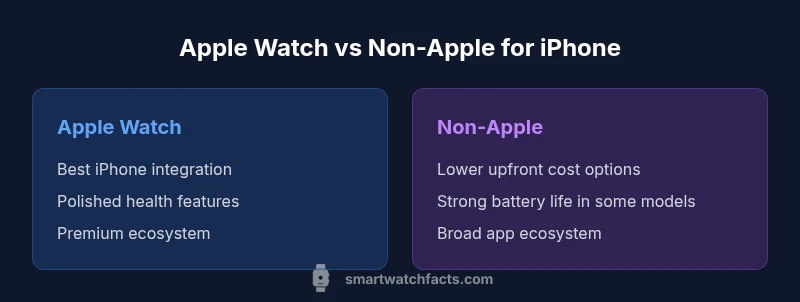
Strengths
- Apple Watch delivers the strongest iPhone integration and immediate access to native apps
- Robust health features with reliable data sharing to HealthKit
- High-quality app ecosystem and consistent software updates
Weaknesses
- Higher upfront cost compared with many non-Apple watches
- Limited cross‑platform feel; some features don’t translate fully
- Privacy and data handling can be more controlled in the Apple ecosystem
Apple Watch remains the strongest overall for iPhone users; non-Apple watches are viable for budget and niche needs
Choose Apple Watch for seamless iPhone integration and privacy. Consider non-Apple options if budget or battery life matters more, but be aware of potential feature gaps.
People Also Ask
Is an Apple Watch the best choice for iPhone users?
For most iPhone users, the Apple Watch offers the smoothest integration, strongest health metrics, and best privacy controls. If you rely heavily on iOS features, this is typically the safest default choice.
Yes—most iPhone users will find the Apple Watch to be the best starting point for seamless iPhone integration.
Can non-Apple watches work with iPhone?
Yes, many non-Apple watches pair with iPhone and provide solid notification support and fitness tracking, but some iOS‑specific features may not be available or fully integrated.
Yes, but expect some trade‑offs in iPhone‑specific features.
Do all smartwatches track heart rate and sleep?
Most modern smartwatches include heart-rate monitoring and sleep tracking, but the depth and accuracy vary by model. Check sensor specs and app support for your preferred metrics.
Most do, but compare sensors before buying.
How should I choose based on budget?
Define must-have features first, then compare devices on price-to-feature value. Apple Watch typically costs more upfront, while non‑Apple options can deliver competitive features at lower prices.
Start with features, then weigh price against value.
Is privacy better on Apple Watch?
Apple emphasizes on‑device processing and privacy controls, which many users prefer. Other brands offer strong privacy in some regions but can vary by app ecosystem and cloud storage.
Apple tends to prioritize on-device privacy; check each brand’s data practices.
Key Points
- Prioritize iPhone integration for the best experience
- Assess health sensors and HealthKit compatibility
- Balance price vs features when comparing rivals
- Test battery life against your daily routine
- Plan setup for quick, painless daily use