Fitbit Smart Watch vs Apple Watch: In-Depth Comparison
A detailed, objective comparison of Fitbit smart watch models and Apple Watch, focusing on health features, battery life, app ecosystems, and value to help you choose the right wearable.


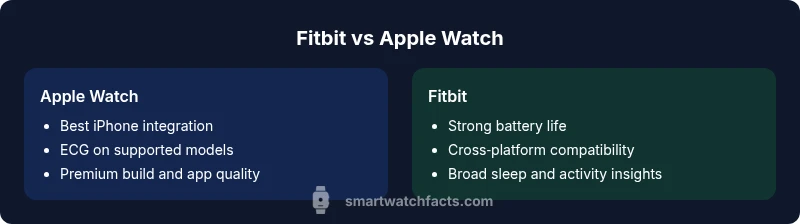
In the Fitbit smart watch vs Apple Watch comparison, the best pick depends on your ecosystem and priorities. If you use an iPhone and want the strongest health suite, app quality, and seamless notifications, Apple Watch is typically the better match. If you prefer longer battery life, a budget-friendly fitness-focused experience, and broad sleep tracking, Fitbit shines. Your device compatibility matters most.
Market positioning and product philosophy
The smartwatch space today sits at the intersection of health tracking, everyday productivity, and seamless device integration. Apple Watch products are designed as a tightly integrated extension of the iPhone ecosystem, prioritizing quick interactions, notifications, and health features that leverage iPhone‑level data processing and app quality. Fitbit devices, by contrast, emphasize accessible fitness tracking, sleep insights, and longer battery life with a focus on independent health metrics and broad compatibility with both iOS and Android. This contrast isn’t merely about features; it reflects how users engage with their devices on a daily basis. According to Smartwatch Facts, the ecosystem you already rely on often dictates which wearable provides the most value, with Apple Watch excelling in iPhone-centric workflows and Fitbit offering a more platform-agnostic fitness experience.
Health and wellness tracking: sensors and features
Health sensors form the core of any wearable purchase decision. Apple Watch models are known for advanced health capabilities, including heart rate monitoring, blood oxygen sensing, ECG on supported devices, and continuous wellness insights that feed into broader health apps. Fitbit devices deliver robust HR tracking, sleep stages, activity metrics, and stress indicators, typically with a strong emphasis on long-term trends and habit formation. While Apple Watch places particularly strong emphasis on medical-grade cues in select models, Fitbit emphasizes accessibility and consistency across a wide range of activities and sleep metrics. The Smartwatch Facts team notes that both brands are increasingly measuring health context (e.g., heart rate variability, sleep consistency) rather than isolated spikes, which helps users interpret daily wellness in a practical way.
Fitness tracking and workouts: GPS and exercise modes
When it comes to workouts, both platforms cover the basics and then diverge in emphasis. Apple Watch generally provides a polished exercise app experience with guided workouts, automatic exercise detection, and integrations with third-party fitness services. GPS performance is strong on most modern Apple Watch models, enabling precise distance and pace data for runners and cyclists. Fitbit, meanwhile, tends to offer a broad set of activity profiles, robust on-device coaching, and efficient auto-detection for common workouts. GPS on Fitbit devices varies by model but typically remains reliable for everyday workouts and outdoor activities. For users who want a calendar of activities accumulated over weeks, Fitbit’s ecosystem often provides more granular day-by-day insights without needing a high-end smartphone to interpret the data.
OS, apps, and ecosystem: what runs where
The operating system and app ecosystem are a major source of divergence. Apple Watch runs on watchOS and hinges on the broader iPhone app ecosystem, with a curated App Store and high-quality companion apps. Fitbit operates on Fitbit OS, delivering a curated app gallery that emphasizes health and fitness utilities and tends to work across iPhone and Android with the Fitbit app acting as the universal hub. This difference matters for developers, data portability, and how features like payment, messaging, and smart replies appear in daily life. If you value a large app library and native iPhone interactions, Apple Watch generally leads; if you want broad cross‑platform compatibility and a fitness-first app environment, Fitbit delivers strong value.
Notifications, calls, and smart features
Notifications and messaging feel essential on a daily basis. Apple Watch offers tight iPhone integration for calls, texts, emails, and app notifications, with quick replies and a consistent, polished interaction model. Fitbit improves on fitness-centric reminders and quick interactions but usually relies on the companion phone for richer messaging capabilities. All models allow you to interact with assistants, weather, calendar events, and music controls, yet the depth and timing of these interactions are typically more nuanced on Apple Watch. In real-world use, this translates to faster, more natural communication flows on iPhone, and simpler, long-life experiences on Fitbit devices.
Battery life, charging, and longevity
Battery life remains one of the most frequently cited decision factors. Apple Watch models typically require daily charging to maintain full functionality across health tracking, notifications, and apps. Fitbit devices are designed with longer intervals between charges, offering multi-day endurance on many models for simple activity tracking, sleep analysis, and notifications. The practical upshot is that Apple Watch suits users who primarily carry their phone and rely on constant connectivity, while Fitbit appeals to those who want to minimize charging interruptions during travel or long workdays. Smartwatch Facts analysis emphasizes that charging cadence significantly affects how often a wearable is worn, directly influencing perceived value and adherence to health routines.
Design, comfort, and durability
Feel and fit matter as much as features. Apple Watch emphasizes premium materials, a refined anodized aluminum or stainless steel body, and a highly customizable band ecosystem, focusing on a premium urban look. Fitbit devices tend to prioritize lighter frames, sportier styling, and a broad range of sizes with comfortable straps that suit all-day wear. Durability is typically solid in both brands, with water resistance suitable for swimming in most models and reinforced glass construction. The user’s comfort and style preferences often guide long-term satisfaction more than marginal feature differences.
Compatibility with iPhone and Android devices
Device compatibility is a core gating factor. Apple Watch is designed to work best with iPhone and does not pair with Android without limited functionality. Fitbit offers broader compatibility, pairing with both iOS and Android via the Fitbit app, but some advanced features may be restricted on non‑iOS platforms or require phone proximity for full capability. If you are committed to an iPhone, Apple Watch unlocks a cohesive experience with deep system integration. If you favor Android or want a wearable that works across platforms, Fitbit is typically the more flexible option.
Pricing, value, and total ownership cost
Pricing and value discussions are inescapable in a Fitbit smart watch vs Apple Watch debate. Apple Watch models tend to command a premium, particularly for the latest hardware and health features. Fitbit devices offer a broader price range, including more budget-friendly options that still cover core fitness and health tracking. Over time, ownership costs depend on how often you replace the device, the cost of compatible accessories, and whether you subscribe to premium health features. Smartwatch Facts analysis suggests that the best-value choice balances upfront cost, battery life, and the level of health data you actually use.
Privacy, data management, and health data portability
Data privacy and control are critical in wearable tech. Apple emphasizes a privacy‑forward design with tight data controls and strong data portability within the Apple ecosystem. Fitbit provides robust health tracking and data export options but may rely more heavily on its cloud services and third‑party integrations. For users who value strict data governance and seamless health data portability across devices, these distinctions matter in practical ways. The Smartwatch Facts team notes that reviewing privacy settings and data-sharing preferences is essential after purchase to align the device with personal comfort levels.
Decision framework: choosing Fitbit vs Apple Watch
A practical decision framework starts with your primary smartphone, daily routines, and how you want to use a wearable. If you own an iPhone and want a refined health suite, strong app quality, and immediate integration with iOS features, Apple Watch is often the better choice. If you want to maximize battery life, pay a lower upfront price, and maintain a fitness-focused experience across platforms, Fitbit delivers greater flexibility. Consider your preferred apps, the importance of health metrics like ECG or sleep stages, and how much you value cross-device compatibility. The framework should align with your daily habits and long-run goals.
Real-world user scenarios: who benefits most from each option
A working professional deeply embedded in the Apple ecosystem benefits from an Apple Watch’s native interactions and health features that complement iPhone usage. A student or remote worker who travels light and uses both Android and iOS devices may prefer Fitbit for its battery life and cross-platform convenience. An athlete who tracks runs, swims, and sleep without constant charging might lean toward Fitbit’s endurance. Finally, a family with mixed devices can appreciate Fitbit’s platform-agnostic approach for shared health insights and family accounts. These scenarios illustrate how lifestyle determines the best fit in the Fitbit smart watch vs Apple Watch decision.
Comparison
| Feature | Apple Watch | Fitbit Smartwatch |
|---|---|---|
| Compatibility | iPhone-focused (watchOS) | iOS and Android via Fitbit app |
| Health sensors | ECG on supported models, blood oxygen, HR monitoring | Robust HR, sleep tracking, and wellness insights |
| GPS and workouts | Strong GPS, guided workouts, auto-detection | Broad workout profiles, reliable GPS on many models |
| App ecosystem | watchOS App Store, deep iPhone integration | Fitbit OS with universal Fitbit app, cross-platform |
| Notifications and calls | Rich messaging, calls, Siri integration | Notifications, quick replies, limited third-party messaging |
| Battery life | Typically daily charging | Multi-day endurance on many models |
| Design and build | Premium materials, wide accessory ecosystem | Sporty, lighter, range of sizes |
| Pricing/value | Premium pricing, strong resale and ecosystem value | More budget-friendly options across a range |
Strengths
- Strong iPhone integration and app quality
- Broad health features and reliable ECG on supported models
- Premium build quality and strong resale value
- Cross-platform flexibility with Fitbit OS
- Longer battery life on many Fitbit models
Weaknesses
- Apple Watch is typically more expensive upfront
- ECG and advanced health features limited to certain Apple models
- Apple ecosystem lock-in can limit cross-device use
- Some health features require subscriptions or premium tiers
- Fitbit can have a less polished app store experience compared to Apple
Apple Watch is the default choice for iPhone users; Fitbit is the smarter pick for cross‑platform users and battery longevity
Choose Apple Watch if iPhone integration and a refined health feature set are your priorities. Opt for Fitbit if you want cross-platform flexibility, longer battery life, and a budget-friendly fitness-focused wearable. The Smartwatch Facts team’s verdict is guided by ecosystem alignment and real-world usage patterns.
People Also Ask
What are the main differences in health features between Fitbit and Apple Watch?
Apple Watch offers advanced health sensors including ECG on supported models and blood oxygen monitoring, while Fitbit emphasizes robust heart rate, sleep tracking, and wellness insights across a wide range of devices. The choice often comes down to which health metrics you rely on most and how you want to visualize trends over time.
Apple Watch has ECG and blood oxygen on supported models; Fitbit focuses on heart rate and sleep data across devices.
Can I use Fitbit devices with an iPhone and still get full functionality?
Yes, Fitbit devices work with iPhone via the Fitbit app, but some advanced features may be limited compared to the Apple Watch. You’ll still get core fitness tracking, activity history, and notifications through the companion app.
Fitbit works with iPhone, but some features may be more limited than on Apple Watch.
Is the Apple Watch worth it if I don’t have an iPhone?
If you don’t own an iPhone, Apple Watch will have limited functionality and won’t provide the full experience. Fitbit, by contrast, remains a viable cross‑platform option for Android and iPhone users.
Apple Watch is best with iPhone; Fitbit works across platforms.
Does GPS performance differ significantly between the two brands?
Both brands offer reliable GPS for most daily activities, but Apple Watch GPS tends to be highly polished within the iPhone ecosystem, while Fitbit GPS reliability is strong across its range, with models optimized for different activity levels.
Apple Watch GPS works very well with iPhone; Fitbit GPS is reliable across devices.
How should I think about price when choosing between Fitbit and Apple Watch?
Apple Watch models generally carry a premium price, reflecting ecosystem integration and build quality. Fitbit offers a broader price range with budget-friendly options, which can be more appealing for budget-conscious buyers or those seeking a fitness-first focus.
Apple Watchs cost is higher; Fitbit offers budget-friendly choices.
What about privacy and data portability for these wearables?
Apple emphasizes privacy controls and data ownership within its ecosystem, while Fitbit provides strong health data collection with export options, requiring careful review of settings and permissions to suit personal privacy preferences.
Apple emphasizes privacy; Fitbit offers data export and sharing controls.
Key Points
- Choose Apple Watch for iPhone-centric workflows.
- Consider Fitbit for cross-platform use and longer battery life.
- App quality and health features are ecosystem-dependent.
- Battery life drives convenience for travel and long days.
- Privacy settings should be reviewed before use.