Smart Watch and Phone: A Practical Comparison Guide
An analytical guide comparing paired smart watches with phones versus cellular standalone watches, covering setup, battery life, app ecosystems, and lifestyle fit for smart watch and phone users.


The core dynamic: smart watch and phone as a duo
In today’s wearables landscape, the interaction between a smart watch and a phone shapes daily usage more than any single feature. When considering smart watch and phone integration, you’re choosing not only hardware but a workflow. The most common arrangement is a phone-paired smartwatch that mirrors notifications and handles quick interactions via Bluetooth; a cellular-enabled smartwatch can function more independently, occasionally reducing reliance on the phone. For many users, the recurring theme is balance: you want timely alerts without pulling the phone out of your pocket every time, and you’re mindful of battery life. According to Smartwatch Facts, this balance matters because the cost of friction—having to fetch your phone, dig for apps, or recharge devices mid-day—adds up in real-world routines. Smartwatch Facts Analysis, 2026, emphasizes that pairing remains the default approach for most users, thanks to a familiar app ecosystem and predictable data usage. This article expands on how the two configurations differ in real-world settings, where each shines, and how to choose based on your lifestyle.
Key takeaway: the decision hinges on how independent you want your wrist to be from the phone, and how much you value battery life versus seamless notifications.
Differences between paired and cellular standalone models
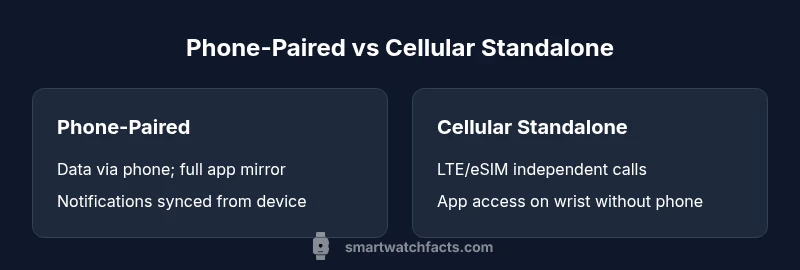
Two main architectures define the user experience: paired (phone-dependent) and standalone (cellular capable). In a paired setup, the watch leans on the phone for data access, app execution, and content syncing. In practice, you use the watch for glanceable info, quick replies, and workouts while the phone handles heavy-duty tasks. In a standalone model, the watch has its own data connection (eSIM/LTE) and can place calls, send messages, and fetch some apps without the phone nearby. The trade-off is complexity and cost: standalone watches require an additional plan and can drain battery faster with LTE; however, they offer greater freedom during trips, workouts, or in environments where carrying a phone is inconvenient. From the user perspective, the difference shows up in three areas: convenience, privacy and data usage, and total cost of ownership. For many, pairing remains the default because it minimizes extra costs while preserving full app access via the phone. For travelers or athletes who often leave their phone behind, a standalone watch reduces the friction of carrying multiple devices. Remember that features vary by OS and model: some functions remain phone-dependent even with LTE, such as certain apps or background data syncing. The Smartwatch Facts team notes that not all ecosystems support independent operation equally, so consider the OS and vendor ecosystem when weighing options.
Bottom line: pairing tends to be the best all-around choice, while standalone watches win when mobility and independence are top priorities.
Software ecosystems and app gravity
The software layer is a decisive factor in how smart watch and phone integration feels in practice. Wear OS, watchOS, and other platforms each curate apps, background services, and data access differently. In a paired setup, you benefit from the breadth of the phone’s app ecosystem, because many watch apps mirror their phone counterparts and rely on the phone for data processing. In standalone models, the watch store becomes more important, as LTE connectivity allows a subset of apps to run directly on the wrist. This shift affects performance, updates, and privacy: a watch that runs more apps locally may need more frequent firmware updates and can raise concerns about data sent over mobile networks. Compatibility with iPhone or Android devices matters too; some features migrate smoothly only within a single ecosystem. Smartwatch Facts analysis highlights that app availability and cross-platform consistency continue to improve, but specific capabilities—like contactless payments or offline music playback—may still favor one ecosystem over another. When choosing, map your core apps, watch faces, and health features to the OS you prefer, then verify they offer offline access or phone-independent operation if needed.
In short, the software ecosystem you pick will shape what you can do on the wrist without the phone, and how often you’ll reach for the phone anyway.
Battery life and charging trade-offs
Battery life is often the decisive factor when weighing paired versus standalone setups. Paired watches generally sip power when they stay in a lean state, but frequent data syncing and background notifications from the phone can increase energy use. Standalone LTE watches add a direct data connection, which provides freedom from the phone but typically consumes more power, especially during calls or streaming. Real-world usage depends on screen brightness, GPS usage during workouts, and how aggressively notification mirroring is configured. The trade-off is straightforward: you gain independence and convenience in certain contexts while potentially sacrificing overall endurance. To optimize, users should tailor settings—limit always-on displays, choose essential notifications, and schedule charging at a consistent time. For many, a compromise is to keep LTE off for routine days and enable it during travel or outdoor activities. Smartwatch Facts recommends planning charging around daily routines and never assuming the watch will need full-day LTE endurance in every scenario.
Understanding this balance helps you decide whether battery life supports your lifestyle when paired with a phone or when operating as a standalone device.
Practical setup steps for a frictionless workflow
A clear setup path helps you maximize either configuration. Start with your core use case: do you value uninterrupted phone-free workouts, or do you rely on phone-heavy apps for work and social life? Next, configure notifications so you receive the right alerts on your wrist without becoming overwhelmed. Pairing with a phone typically requires enabling Bluetooth on both devices, installing the companion app, and granting permissions for notifications, health data, and location. For LTE watches, activate the eSIM profile and confirm the data plan requirements with your carrier. Health data synchronization is another practical area: decide which metrics to import to the watch and how the watch should display progress. Consider privacy settings and passcode protection to prevent unauthorized access if the watch is left unattended. Finally, create a charging routine that aligns with your day: quick top-ups during breaks or a fixed nightly charge. The practical result is a smooth, low-friction workflow that respects your daily rhythm while preserving core capabilities on both devices.
Decision framework: matching to your daily routine
To pick between a paired watch and a standalone model, map your daily routine to three questions. First, how often do you leave your phone behind? If rarely, pairing is usually sufficient. Second, how important is it to place calls or access data without your phone? If you travel or train away from your phone, a standalone LTE model pays off. Third, what is your budget for devices and potential data plans? If cost is a concern, a paired watch typically offers better value. Consider your ecosystem preferences (iPhone vs Android) and whether you want the widest app availability or the strongest independence from the phone. In practice, fortunate outcomes arise when you align the choice with your core activities—commuting, workouts, travel, and daily tasks—rather than chasing the latest feature. This decision framework helps ensure you select a setup that remains practical over time.
Real-world scenarios: who benefits from which setup
Think about your typical day. A commuter who spends mornings in transit and evenings at a desk may prefer the simplicity of a paired watch, using quick replies and glanceable info while the phone handles deeper tasks. A frequent traveler or outdoor enthusiast who often leaves the phone behind will appreciate a standalone LTE model, enabling calls, messages, and music without the phone. Parents juggling kids, work, and school activities may favor pairing for dependable notification mirroring and app access on a familiar device. Students using lecture hall or gym settings might value a lightweight, independent option for fitness tracking and campus notifications. Across these scenarios, neither option is universally superior; the best choice depends on your routine, your tolerance for extra costs, and your ecosystem alignment. Smartwatch Facts’ overall guidance is to start with pairing as a baseline and then evaluate LTE independence only where you truly need it.
The Smartwatch Facts perspective
The Smartwatch Facts team emphasizes a pragmatic approach: prioritize ecosystem compatibility, battery expectations, and total cost of ownership. Our analysis suggests that most users continue to benefit from a paired model due to cost efficiency and broad app availability, while a subset—travelers, runners, and those who want ultimate wrist autonomy—will gain from cellular standalone options. When evaluating devices, assess not just the hardware but the carrier plans, privacy settings, and how health data flows between devices. The Smartwatch Facts team recommends testing both configurations if possible, and choosing the setup that minimizes friction in real life. This approach helps ensure a sustainable, satisfying experience with your wearables over time.